A case study in ML - Iris flower data set
Case study in ML - Iris flower data-set.
Today, we are going to talk about the implementation of machine-learning to solve a classic problem in data science, which is, iris flower data-set. This is one of the first and basic case studies machine-learning enthusiasts encounter while working on machine learning.
The aim of this case study is to see if a program can predict the type of flower correctly if it has been trained on similar data of flowers.
For this, we would take the iris data set from this link.
The data set includes three different types of flowers. They are all species of iris named as setosa, versicolor and
virginica. Below a sample screenshot of how the data looks like:
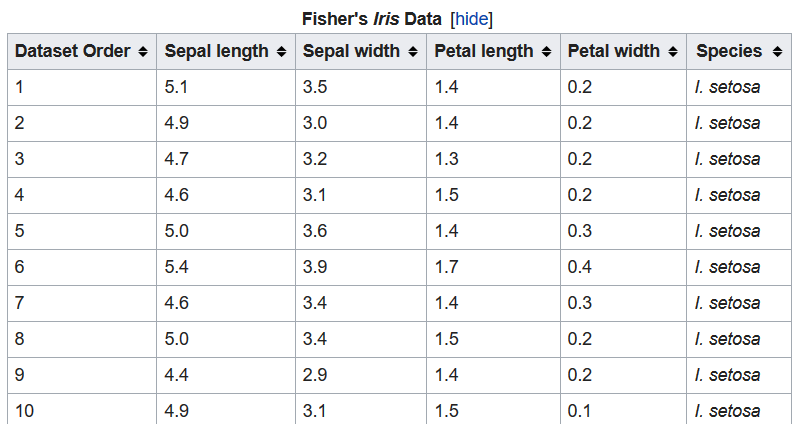
In the data set, we are given 50 examples of each type of flower. Each flower is defined by four features
which are sepal length, sepal width, petal length and petal width. Hence, the first four columns give the features
and the last column gives the label which is the type of flower. Our goal is to use this data set to train our
classifier, and then we can use that classifier to predict the species of a new given flower. We could have used
many different classifiers like neural nets or support vector machines to solve this problem , but we are going to
stick to the same Decision Tree classifier because they are easy to read and understand.
Let us get started with hands-on:
- First, let us create an empty python file. Let us name it
iris-flower.py. - Now, let us get done with the imports.
scikit-learnhas already provided lot of sample data sets and luckily iris data-set is one of them. Along with it, we will import some other utilities as well. Our program looks something like this now:import numpy as np from sklearn.datasets import load_iris from sklearn import treeThe first import would get the
numpylibrary which is used for scientific computing. If you have installedpythonwithcondacorrectly,numpywill be available already. In the second import, we are importing the iris flower data set. Third import is just importing tree as in the previous example. - Now, we are ready to load the iris data set in a variable like this:
iris = load_iris() -
Now, we would identify some rows in the data set, which we would use to predict the output later. For this example, we would get the
0th,50thand100throw from the data set. If we look at the data set from the link we can clearly identify that0th,50thand100throw corresponds tosetosa,versicolorandvirginicarespectively. So basically, we have picked one flower of each type for our testing data. - Now, we will remove the above mentioned rows from the data set. The code for it looks like this:
training_data = np.delete(iris.data, test_index, axis=0) training_target = np.delete(iris.target, test_index)the variable
iris.datacontains the features (length, width etc) andiris.targetcontains the label value. Again, in this data set, 0,1 and 2 meanssetosa,versicolorandvirginicaflower. So essentially, we have removed those three entries from the data set. Now, our training data is ready. - Now, let us prepare our testing data. This is the data, we would use to verify if our program is able to identify the
flower type with some level of accuracy or not. Below is the code for the same:
testing_data = iris.data[test_index] # length etc - features testing_target = iris.target[test_index] # flower types - labelsAgain,
testing_datais the set of features, we would provide to the program, to get the output. Then, the output will be matched againsttesting_targetto see if it has predicted the output correctly. - Now, we will initialize the classifier and feed the data set to it.
clf = tree.DecisionTreeClassifier() clf = clf.fit(training_data, training_target) - Now, let us provide the classifier with a sample input and check if it is able to predict the output correctly or not.
print ("expected output is: %s" %(testing_target)) print ("actual output is: %s" %(clf.predict(testing_data))) - Our program is complete and this is how it looks like:
import numpy as np from sklearn.datasets import load_iris from sklearn import tree iris = load_iris() test_index = [0,50,100] #training data created by picking 0, 50 and 100 entry. basically picking one flower for each type. training_data = np.delete(iris.data, test_index, axis=0) #holds features training_target = np.delete(iris.target, test_index) # holds labels #testing data testing_data = iris.data[test_index] # length etc - features testing_target = iris.target[test_index] # flower types - labels clf = tree.DecisionTreeClassifier() clf = clf.fit(training_data, training_target) print ("expected output is: %s" %(testing_target)) print ("actual output is: %s" %(clf.predict(testing_data))) - Upon running the program, this is the output we get:
  expected output is:  [0 1 2]
  actual output is:  [0 1 2]
This means, the it has predicted the first row of testing data as
setosa, second asversicolorand third asvirginica, which is exactly what we expected.
This concludes our case study of iris flower data set using machine learning.
If you have any questions or feedback, please put your thoughts in the comments section below.
Happy learning !!